The best thing I read each week was always in someone else's inbox format.
I wanted to share those ideas with Portuguese-speaking readers. Doing it by hand meant reading, rewriting, translating, formatting, publishing and emailing. That's an evening of work for one issue.
So I built a pipeline where the first step is a single action: forward an email.
From there, the system saves the email and has Claude write a new article in Portuguese. It adds English and Spanish versions, checks each factual claim against the email, and opens the post for my review. Once I approve it, the article goes live on my site, and one command sends it through Mailchimp.
The first article went from forwarded email to a live post and a real campaign. Here's the whole system, so you can build your own.
The workflow
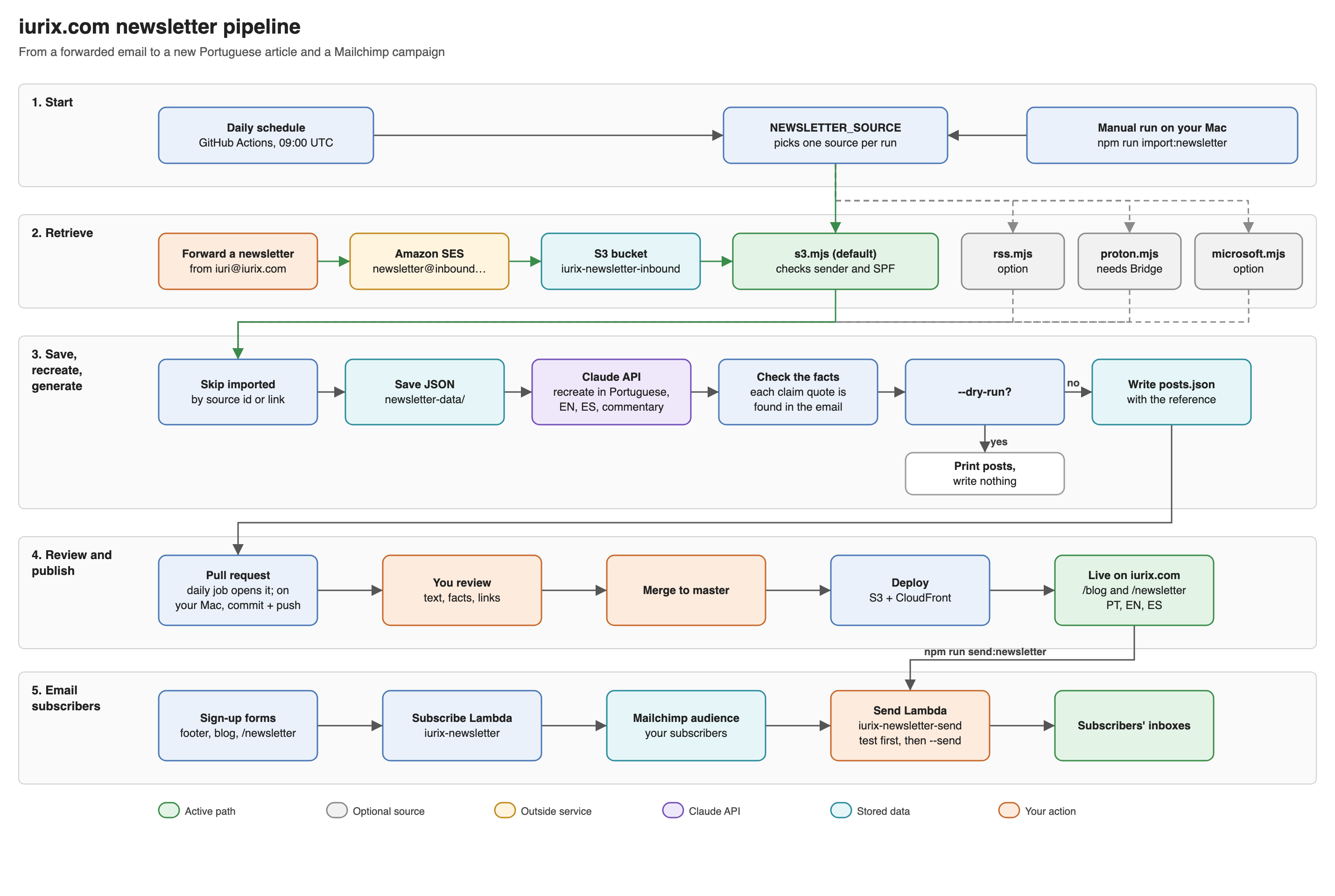
The pipeline has five stages: start, retrieve, generate, publish and send. Green marks the active path, and orange marks the steps where a person stays in control.
What it's made of
| Layer | Tool | Job |
|---|---|---|
| Receiving mail | Amazon SES and S3 | Catches forwarded emails and stores them |
| Importer | Node.js script | Filters, saves and orchestrates each run |
| Writing | Claude API | Recreates the article and translates it |
| Review | GitHub pull requests | Keeps a person between the AI and the public |
| Website | React on S3 and CloudFront | Serves the blog and newsletter pages |
| Sending | AWS Lambda and Mailchimp | Sends campaigns without exposing the API key |
Setup, step by step
1. Give the pipeline its own email address. Create a subdomain such as inbound.yourdomain.com and verify it in Amazon SES. Add one MX record for that subdomain, pointing at the SES inbound endpoint for your region. Your main email keeps working, because you never touch its MX record.
2. Save incoming mail to S3. Create a private bucket and a bucket policy that lets SES write to it. Then create a receipt rule for your new address that delivers to the bucket, with spam and virus scanning on. Add a lifecycle rule to delete old emails, and remember the step everyone misses: set the rule set as active.
3. Install the importer. It's a Node.js project with one main command:
cp .env.newsletter.example .env.newsletter
npm install
npm run import:newsletter -- --dry-run --limit=1
The dry run shows what would be published and writes nothing to the blog. Each retrieved email is saved as JSON in a git-ignored folder, so you keep a full record without publishing the original.
4. Connect the AI. Create a Claude API key. One thing surprised me here: a Claude Pro subscription doesn't include API usage. The API has its own prepaid credits.
I don't ask Claude to translate. I ask it to recreate the article: find a new angle and structure, keep every fact from the source, and attribute opinions to their authors. It returns structured JSON with the title, text, commentary, reference and translations.
5. Make facts checkable. For every factual claim, Claude must quote the exact passage that supports it. The script then searches the email for that quote and flags anything it can't find. On the first article, all 28 claims matched.
6. Render it on the site. Each post stores its translations and a reference to the original. The reader sees their own language, a labelled IURIX commentary, and a clear note that the text was recreated with AI, with a link to the source.
7. Send through a private Lambda. The Mailchimp key lives only inside AWS. The Lambda has no public URL, so only AWS credentials can call it. The local command builds the email and asks the Lambda to send it.
8. Schedule it. A GitHub Action runs daily, imports anything new and opens a pull request. Merging that pull request is what publishes the post.
Configuration
Everything that changes between setups lives in environment settings or one editable file.
| Setting | What it controls |
|---|---|
ANTHROPIC_API_KEY | Access to Claude. Keep it out of your code |
NEWSLETTER_SOURCE | Where articles come from: S3, RSS, Proton or Microsoft 365 |
NEWSLETTER_ALLOWED_SENDER | The only address allowed to feed the pipeline |
NEWSLETTER_BUCKET | The S3 bucket holding received emails |
MAILCHIMP_TEST_EMAIL | Where test campaigns go |
prompt-context.md | Your voice, audience and the angle of each commentary |
That last file matters most. Editing a few plain sentences changes how every future commentary sounds, with no code involved.
Using it every week
Once it's set up, publishing an issue looks like this:
- Forward a newsletter you'd like to build on.
- Review the pull request: the text, the claims and the link to the original.
- Merge it. Your deploy puts the post on the blog and the newsletter page.
- Test the campaign, which emails only you:
npm run send:newsletter- Send it to your audience:
npm run send:newsletter -- --sendThe send command refuses to run until the post is live and a tested draft exists. It also won't send the same post twice in the same language.
What broke, so yours doesn't
No real project works the first time. These six problems cost me the most time.
| Symptom | Real cause | Fix |
|---|---|---|
| Couldn't read my Proton inbox | I found no official public API for reading mail | Receive mail directly with SES |
credit balance is too low | A Claude Pro plan doesn't cover the API | Buy API credits |
| Emails never reached S3 | The SES rule set existed but wasn't active | Set it as active |
cannot invoke a durable function | Durable execution was ticked on the Lambda | Recreate it as a regular function |
| Every page returned 404 | The domain pointed at GoDaddy, not CloudFront | Fix the www CNAME and the domain forwarding |
| Tests passed locally, failed on GitHub | My Mac ran Node 26, the workflow ran Node 24 | Use a test command that works on both |
The DNS one is my favourite. I expected a missing route for sitemap.xml. In fact, the site was healthy on CloudFront and the sitemap was deployed. The domain just wasn't pointing at it. Check the layer below the one you suspect.
The guardrails that make it publishable
Fast publishing without trust is just faster mistakes. These rules stay on:
- A person approves everything. Nothing goes live or reaches subscribers without review.
- Only one sender is accepted. The address must match, and SES's own SPF check must pass.
- The original is always credited, with its author, publication, date and link.
- AI use is disclosed on the site and in the email.
- Secrets stay server-side. No API key reaches the browser.
One limit deserves honesty. The fact check proves a quote exists in the email. It doesn't prove the email is true, so serious claims still need a human reading them. A recreated article can also count as a derivative work, so check the rights before you depend on one source.
What happened on the first run
A real forwarded newsletter became a 557-word Portuguese article. All 28 claims matched the email, and it's live with English and Spanish versions. It then went out as a real campaign, to my audience of exactly one.
That's the honest part: the machine works, and now it needs readers. The daily schedule is the last piece I'm still proving in production.
Want this for your business?
The same pattern fits any team that turns source material into published content: reports, research, internal updates or client newsletters.
At IURIX, we design cloud, data and AI systems like this one.
- Follow the build: subscribe at iurix.com/newsletter.
- Want one of your own? Talk to us at iurix.com.